Showing posts with label Programming. Show all posts

8085 Simple programming Examples


The programmes are based on the Data transfer group for other group search in our search box
Let’s do a program
MVI   A,20h
STA   5050h
HLT
Here, ‘MVI A, 20h’ stores the 20h in accumulator, and STA stores the content of accumulator to to 5050.

OUTPUT
A:20
           [5050]:20
                  
1)      Store accumulator content indirect
·         STAX Rp;
·         1 byte instruction

To understand this instruction let’s take an example
LXI            D,4060h;
MVI          A,20h;
STAX        D              ;[4060]ß20h
HLT
Here, LXI loads the immediate data 4060h to register pair D ,MVI moves 20h data to  accumulator and STAX instruction  content of accumulator is stored in address pointed by register D.
So he output is
D:40  E:60
A:20                                  

[4020]: 20
2)      Input from input port
Do yourself
3)      Output to output


Do yourself      

1)      write a program to move data from register B to C,C to D and D to E.

MOV        C,B   ; moves data from register B to C
MOV        D,C    ;moves data from register C to D
MOV        D,E     ; moves data from register ram D to E
HLT                     ;stops the program

Output :
Let register B contains data 20h
B: 20h   C: 20h
D: 20h   E:  20h


2)      Write a program to store 20h in address 4040.
1st  method
LXI      H, 4030h      ; stores 4030h in HL register pair
MVI     B,20h          ; stores 20h to register B
MOV   M,B             ; moves content of register B to memory location 4040
HLT

2Nd method
MVI   A, 20h
STA    4040h
HLT

Output
B: 20         C: J J
H:40            L:30
[4040] : 20
Write a program to store the data 40H and 20H to the address 5051 and 5052 respectively.
Method 1

LXI      H, 5051h     ; Loads 5051 to HL pair
MVI    M, 40h         ; moves the data 40 h to memory location pointed by HL i.e.5051
LXI      H, 5052h     ; Loads address location 5051 to HL pair
MOV   M,20h          ; moves the data 40 h to memory location pointed by HL ie,5051
HLT                         ; stops the program

Method 2

MVI   A, 40H      ; Moves data 40H to the accumulator
STA    5051H      ; Loads the content of accumulator content to address 5051
MVI    A, 20H     ; Moves data 20H Accumulator
STA    5052H      ; Loads the content of accumulator content to address 5052
HLT

Output
[5051] : 40
[5052] : 20

2) Write the program to store the data from the memory location 2051 and 2052 to register B and C respectively.
(Before doing this program in simulator load data in memory location 2051 and 2052 yourself)
Method 1

LDA     2051H      ; load the content of address 2051 to the accumulator
MOV   B,A           ; Moves the data from Acc.  Register to B
LDA    2052H       ; load the content of address 2051 to the accumulator
MOV   C,A           ; Moves the data from Acc. to register C
HLT


Method 2

LXI         H,2051H   ;loads 2051 to HL pair
MOV      B,M          ;moves the content of memory ( i.e. address containing  in HL pair ) to B reg

[ note ]C Fundamentals

A Brief History of C


C is a general-purpose language which has been closely associated with the UNIX operating system for which it was developed - since the system and most of the programs that run it are written in C.

Many of the important ideas of C stem from the language BCPL, developed by Martin Richards. The influence of BCPL on C proceeded indirectly through the language B, which was written by Ken Thompson in 1970 at Bell Labs, for the first UNIX system on a DEC PDP-7. BCPL and B are "type less" languages whereas C provides a variety of data types.

In 1972 Dennis Ritchie at Bell Labs writes C and in 1978 the publication of The C Programming Language by Kernighan & Ritchie caused a revolution in the computing world.

In 1983, the American National Standards Institute (ANSI) established a committee to provide a modern, comprehensive definition of C. The resulting definition, the ANSI standard, or "ANSI C", was completed late 1988.

Structure of a program

Every C program consists of one or more modules called functions.
One of these functions is called main. The program begins by executing main
function and access other functions, if any. Functions are written after or before
main function separately. A function has (1) heading consists of name with list of
arguments ( optional ) enclosed in parenthesis, (2) argument declaration (if any) and
(3) compound statement enclosed in two braces { } such that each statement ends
with a semicolon. Comments, which are not executable statement, of necessary can
be placed in between /* and */.
Example
/* program to find the area pf a circle */
#include<stdio.h>
#include<conio.h>
main( )
{
float r, a;
printf(“radius”);
scanf(“%f”, &r);
a=3.145*r*r;
printf(“area of circle=%f”, area);
}
11
The character set
C used the upper cases A,B,…….,Z, the lower cases a ,b,…..,z and certain
special characters like + - * / = % & # ! ? ^ “ ‘ ~ \ < > ( ) = [ ]
{ } ; : . , _ blank space @ $ . also certain combinations of these characters like
\b, \n, \t, etc…
Identities and key words
Identities are names given to various program elements like variables,
arrays and functions. The name should begin with a letter and other charact4rs can
be letters and digits and also can contain underscore character ( _ )
Exapmle: area, average, x12 , name_of_place etc………
Key words are reserved words in C language. They have predicted
meanings and are used for the intended purpose. Standard keywords are auto,
break, case, char, const, continue, default, do, double, else enum, extern, float,
for, goto, if, int, long, register, return, short, signed, sizeof, static, struct,
switch, typedef, union, unsigned, void, volatile, while. (Note that these words
should not be used as identities.)

Data type

The variables and arrays are classified based on two aspectsfirst is the data type it stores and the second is the type of storage. The basic data types in C language are int, char, float and double. They are respectively concerned with integer quantity, single character, numbers, with decimal point or exponent number and double precision floating point numbers ( ie; of larger magnitude ). These basic data types can be augmented by using quantities like short, long, signed and unsigned. ( ie; long int, short int, long double etc.....).
CONSTANTS
There are 4 basic types of constants . they are int4ger constants, floating-point
constants, character constants and string constants.
(a) integer constants: It is an integer valued numbers, written in three different number system, decimal (base 10) , octal(base8), and hexadecimal(base 16). A decimal integer constant consists of 0,1,…..,9..
Example : 75 6,0,32, etc…..
5,784, 39,98, 2-5, 09 etc are not integer constants.
An octal integer constant consists of digits 0,1,…,7. with 1st digit 0 to
indicate that it
is an octal integer.
Example : 0, 01, 0756, 032, etc…..
32, 083, 07.6 etc….. are not valid octal integers.
12
A hexadecimal integer constant consists of 0,1, …,9,A, B, C, D, E, F. It begins with
0x.
Example: 0x7AA2, 0xAB, etc……
0x8.3, 0AF2, 0xG etc are not valid hexadecimal constants.
Usually negative integer constant begin with ( -) sign. An unsigned integer constant
is identified by appending U to the end of the constant like 673U, 098U, 0xACLFU
etc. Note that 1234560789LU is an unsigned integer constant.
( b) floating point constants : It is a decimal number (ie: base 10) with a decimal
point or an exponent or both. Ex; 32.65, 0.654, 0.2E-3, 2.65E10 etc.
These numbers have greater range than integer constants.
(c) character constants : It is a single character enclosed in single quotes like ‘a’. ‘3’, ‘?’, ‘A’ etc. each character has an ASCII to identify. For example ‘A’ has the ASCII code 65, ‘3’ has the code 51 and so on.
(d) escape sequences: An escape sequence is used to express non printingcharacter like a new line, tab etc. it begin with the backslash ( \ ) followed by letterlike a, n, b, t, v, r, etc. the commonly used escape sequence are
\a : for alert \n : new line \0 : null
\b : backspace \f : form feed \? : question mark
\f : horizontal tab \r : carriage return \’ : single quote
\v : vertical tab \” : quotation mark
(e) string constants : it consists of any number of consecutive characters enclosed
in double quotes .Ex : “ C program” , “mathematics” etc……

Variables and arrays

A variable is an identifier that is used to represent some specified type of information. Only a single data can be stored in a variable. The data stored in the variable is accessed by its name. before using a variable in a program, the data type  it has to store is to be declared.
Example : int a, b, c,
a=3; b=4;
c=a+b
]
Note : A statement to declare the data types of the identifier is called declaration statement. An array is an identifier which is used to store a collection of data of the same type with the same name. the data stored is an array are distinguished by the subscript. The maximum size of the array represented by the identifier must be mentioned.
13
Example : int mark[100] .
With this declaration n, mark is an array of size 100, they are identified by nark[0],
mark[1],……….,mark[99].
Note : along with the declaration of variable, it can be initialized too. For example
int x=10;
with this the integer variable x is assigned the value 10, before it is used. Also note that C is a case sensitive langauge. i.e. the variables d and D are different.

DECLARATIONS

This is for specifying data type. All the variables, functions etc must be declared before they are used. A declaration tells the compiler the name and type of a variable you'll be using in your program. In its simplest form, a declaration consists of the type, the name of the variable, and a terminating semicolon:
Example : int a,b,c;
Float mark, x[100], average;
char name[30];
char c;
int i;
float f;
You may wonder why variables must be declared before use. There are two reasons:
1. It makes things somewhat easier on the compiler; it knows right away whatkind of storage to allocate and what code to emit to store and manipulateeach variable; it doesn't have to try to intuit the programmer's intentions.
2. It forces a bit of useful discipline on the programmer: you cannot introducevariables willy-nilly; you must think about them enough to pick appropriatetypes for them. (The compiler's error messages to you, telling you that youapparently forgot to declare a variable, are as often helpful as they are anuisance: they're helpful when they tell you that you misspelled a variable,or forgot to think about exactly how you were going to use it.)

EXPRESSION

This consists of a single entity like a constant, a variable, an array or a functionname. it also consists of some combinations of such entities interconnected byoperators.
Example : a, a+b, x=y, c=a+b, x<=y etc……..

STATEMENTS

Statements are the ``steps'' of a program. Most statements compute and assign values or call functions, but we will eventually meet several other kinds of statements as well. By default, statements are executed in sequence, one afteranother
A statement causes the compiler to carry out some action. There are 3 different types of statements – expression statements compound statements and control statements. Every statement ends with a semicolon.
Example: (1) c=a + b;
(2) {
a=3;
b=4;
c=a+b;
}
(3) if (a<b)
{
printf(“\n a is less than b”);
}
Statement may be single or compound (a set of statements ). Most of the statements in a C program are expression statements. An expression.statement is simply an expression followed by a semicolon. The lines
i = 0;
i = i + 1;
and printf("Hello, world!\n");
are all expression statements

SYMBOLIC CONSTANTS

A symbolic constant is a name that substitutes for a sequence of characters, which represent a numeric, character or string constant. A symbolic constant is defined in the beginning of a program by using #define, without: at the end.
Example : #define pi 3.1459
#define INTEREST P*N*R/100
With this definition it is a program the values of p, n ,r are assigned the value of
INTEREST is computed.
Note : symbolic constants are not necessary in a C
if u like the post just say thank u in comment box.

[ C programming] Introduction


Some Importantant links below with reports.just view the link below. if u want any project report just search any project on our search box
Arduino interesting projects:   
Arduino 30 simple and good projects 
Atmega projects lists
Android Electronics projects lists
Rf based Projects with report
engineering study notes 
GSM GPS based projects with report
Bluetooth based projects with reports

Computer

Basically it is a fast calculating machine which is now a days used for variety of uses ranging from house hold works to space technology. The credit of invention of this machine goes to the English Mathematician Charles Babbage.

Types of Computers:

Based on nature, computers are classified into Analog computers and Digital computers. The former one deals with measuring physical quantities ( concerned with continuous variables ) which are of late rarely used. The digital computer operates by counting and it deals with the discrete variables.
There is a combined form called Hybrid computer, which has both features. Based on application computers are classified as special purpose computers and general computers. As the name tells special computers are designed to perform certain specific tasks where as the other category is designed to cater the needs of variety of users.

Basic structure of a digital computer

The main components of a computer are Input unit (IU), Central Processing unit (CPU) and Output unit (OU). The information like data ,programs etc are passed to the computer through input devices. The keyboard, mouse, floppy disk, CD, DVD, joystick etc are certain input devices. The output device is to get information from a computer after processing . VDU (Visual Display Unit), Printer, Floppy disk, CD etc are output devices.
The brain of a computer is CPU. It has three components- Memory unit, Control unit and Arithmetic and Logical unit (ALU)- Memory unit also called storage device is to store information. Two types memory are there in a computer. They are RAM (random access memory) and ROM (read only memory ). When a program is called, it is loaded and processed in RAM. When the computer is switched off, what ever stored in RAM will be deleted. So it is a temporary memory. Where as ROM is a permanent memory, where data, program etc are stored for future use. Inside a computer there is storage device called Hard disk, where data are stored and can be accessed at any time.
The control unit is for controlling the execution and interpreting of instructions stored in the memory. ALU is the unit where the arithmetic and logical operations are performed. The information to a computer is transformed to groups of binary digits, called bit. The length of bit varies from computer to computer, from 8 to 64. A group of 8 bits is called a Byte and a byte generally represents one alphanumeric ( Alphabets and Numerals) character. The Physical components of a computer are called hard wares. But for the machine to work it requires certain programs ( A set of instructions is called a program ). They are called soft wares. There are two types of soft wares – System soft ware and Application soft ware – System soft ware includes Operating systems, Utility programs and Language processors.

ASCII Codes:

American standard code for information interchange. These are binary codes for alpha numeric data and are used for printers and terminals that are connected to a computer systems for alphabetizing and sorting.

Operating Systems

The set of instructions which resides in the computer and governs the system are called operating systems, without which the machine will never function. They are the medium of communication between a computer and the user. DOS, Windows, Linux, Unix etc are Operating Systems.

Utility Programs

These programs are developed by the manufacturer for the users to do various tasks. Word, Excel, Photoshop, Paint etc are some of them.
Languages.
These programs facilitate the users to make their own programs. User’s programs are converted to machine oriented and the computer does the rest of works.
Application Programs
These programs are written by users for specific purposes.

Computer Languages

They are of three types –
1 Machine Language ( Low level language )
2 Assembly language ( Middle level language )
3 User Oriented language ( Higher level language )
Machine language depends on the hard ware and comprises of 0 and 1 .This is tough to write as one must know the internal structure of the computer. At the same time assembly language makes use of English like words and symbols. With the help of special programs called Assembler, assembly language is converted to machine oriented language. Here also a programmer faces practical difficulties. To over come this hurdles user depends on Higher level languages, which are far easier to learn and use. To write programs in higher level language, programmer need not know the characteristics of a computer. Here he uses English alphabets, numerals and some special characters. Some of the Higher level languages are FORTRAN, BASIC, COBOL, PASCAL, C, C++, ADA etc. We use C to write programs. Note that Higher level languages can not directly be followed by a computer. It requires the help of certain soft wares to convert it into machine coded instructions. These soft wares are called Compiler, Interpreter, and Assembler. The major difference between a compiler and an interpreter is that compiler compiles the user’s program into machine coded by reading the whole program at a stretch where as Interpreter translates the program by reading it line by line. C and BASIC are an Interpreter where as FORTRAN is a

PROGRAMMING METHODOLOGY

A computer is used to a solve a problem.
Steps
1 Analyze the problem
2 Identify the variables involved
3 Design the solution
4 Write the program
5 Enter it into a computer
6 Compile the program and correct errors
7 Correct the logical errors if any
8 Test the program with data
9 Document the program

Algorithms

Step by step procedure for solving a problem is called
algorithm.
Example
To make a coffee
Step1: Take proper quantity of water in a cooking pan
Step2: Place the pan on a gas stow and light it
Step3: Add Coffee powder when it boils
Step4: Put out the light and add sufficient quantity of sugar and
milk
Step5: Pour into cup and have it.
To add two numbers
Step1: Input the numbers as x, y
Step2: sum=x + y
Step3: print sum
For a better understanding of an algorithm, it is represented pictorially.
The pictorial representation of an

algorithm is called a Flow Chart. For
this certain pictures are used.
Consider a problem of multiplying two numbers
Algorithm
Step1: Input the numbers as a and b
Step2: find the product a x b
Step3: Print the result

Flow chart

In the above example execution is done one after another and straight forward. But such straight forward problems occur very rarely. Some times we have to depend on decision making at certain stage in a normal flow of execution. This
is done by testing a condition and appropriate path of flow is selected. For
example consider the following problem
To find the highest of three numbers
Algorithm
Step 1: read the numbers as x ,y and z
Step 2: compare x and y
Step 3: if x > y then compare x with z and find the greater
Step 4: Otherwise compare y with z and find the greater
Flow Chart :

Exercise: Write Algorithm and flow chart for the solution to the

problem
1. To find the sum of n, say 10, numbers.
2. To find the factorial of n , say 10.
3. To find the sum of the series 1+x+x2+x3+………. + xn
4. To find the sum of two matrices.
5. To find the scalar product of two vectors
6. To find the Fibonacci series up to n
7. To find gcd of two numbers

Some Importantant links below with reports.just view the link below. if u want any project report just search any project on our search box
Arduino interesting projects:   
Arduino 30 simple and good projects 
Atmega projects lists
Android Electronics projects lists
Rf based Projects with report
engineering study notes 
GSM GPS based projects with report
Bluetooth based projects with reports
if u like the post just say thank u in comment box.

[ NOTE ] C PROGRAMMING

 GO TO EVERY LINK LINK WE GUARANTY YOUR SATISFACTION
CONTENTS
 1 Introduction
2 C Fundamentals
3 Operators and Expressions 17
4 Data Input Output 21
5 Control Statements 25
6 Functions 32
7 Arrays 35
8 Program structure 42
9 Pointers 44
10 Structures and Unions 47
11 Datafiles 53

C PROGRAMMING NOTE
DOWNLOADS  BELOW:

Based on the syllabus of Final B.Sc. Mathematics  (Calicut University)  By T K Rajan
if u like the post just say thank u in comment box.

Unix Socket Programming

 click here complete Lecture Notes: Computer Networks

Unix Socket Programming


Client Server Architecture

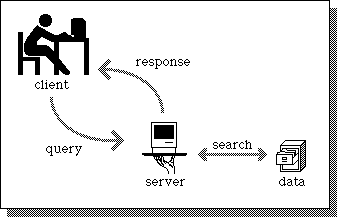
In the client server architecture, a machine(refered as client) makes a request to connect to another machine (called as server) for providing some service. The services running on the server run on known ports(application identifiers) and the client needs to know the address of the server machine and this port in order to connect to the server. On the other hand, the server does not need to know about the address or the port of the client at the time of connection initiation. The first packet which the client sends as a request to the server contains these informations about the client which are further used by the server to send any information. Client acts as the active device which makes the first move to establish the connection whereas the server passively waits for such requests from some client.

Illustration of Client Server Model

What is a Socket ?

In unix, whenever there is a need for inter process communication within the same machine, we use mechanism like signals or pipes(named or unnamed). Similarly, when we desire a communication between two applications possibly running on different machines, we need sockets. Sockets are treated as another entry in the unix open file table. So all the system calls which can be used for any IO in unix can be used on socket. The server and client applications use various system calls to conenct which use the basic construct called socket. A socket is one end of the communication channel between two applications running on different machines.

Steps followed by client to establish the connection:
  1. Create a socket
  2. Connect the socket to the address of the server
  3. Send/Receive data
  4. Close the socket
Steps followed by server to establish the connection:
  1. Create a socket
  2. Bind the socket to the port number known to all clients
  3. Listen for the connection request
  4. Accept connection request
  5. Send/Receive data