Showing posts with label internet. Show all posts

Routing in Internet

 click here complete Lecture Notes: Computer Networks

Routing in Internet

The Origin of Internet

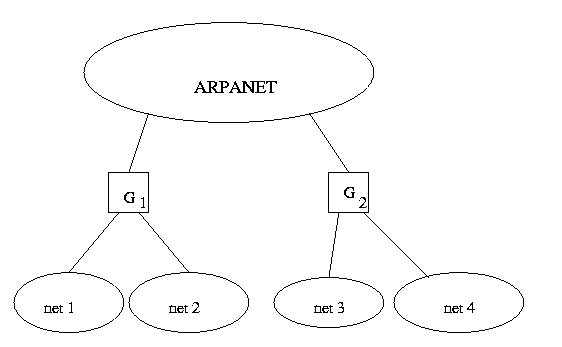
The response of Internet to the issue of choosing routing tables with complete/par tail information is shown by the following architecture. There are a few nodes having complete routing information and a large number of nodes with partial information. The nodes with complete information, called core gateways, are well connected by a Backbone Network. These nodes talk to each other to keep themselves updated. The non-core gateways are connected to the core gateways. (Historically, this architecture comes from the ARPANET.) The original internet was structured around a backbone of ARPANET with several core gateways connected to it .These core gateways connected some Local Area Networks (LANs) to the rest of the network. These core gateways talked to themselves and exchanged routing information's. Every core gateway contained complete information about all possible destinations.

How do you do routing ?

The usual IP routing algorithm employs an internet routing table (some times called an IP routing table) on each machine that Stores the information about the possible destinations, and how to reach them.

Default Routes

This technique used to hide information and keep routing table size small consolidates multiple entries into a default case. If no route appears in the routing table, the routing routine sends the data gram to the default router. Default routing is especially useful when a site has a small set of local addresses and only one connection to the rest of the internet.

Host-Specific Routes

Most IP routing software allows per-host routes to be specified as a special case. Having per-host routes gives the local network administrator more control over network use, permits testing, and can also be used to control access for security purposes. when debugging network connections or routing tables, the ability to specify a special route to one individual machine turns out to be especially useful.

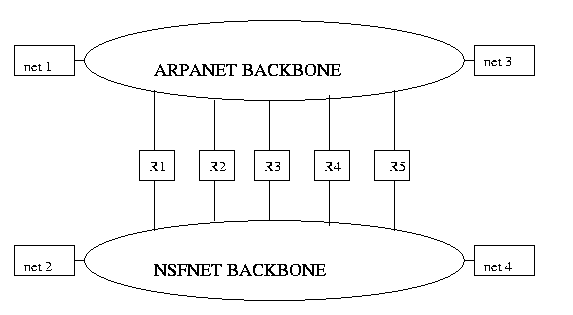
Internet with Two Backbones


Firewalls

 click here complete Lecture Notes: Computer Networks

Firewalls

Introduction

This lecture discusses about security mechanisms in the Internet namely Firewall . In brief, It's a configuration of routers and networks placed between an organization's internal internet and a connection to an external internet to provide security. In other words, Firewall is a mechanism to provide limited access to machines either from the outside world to internal internet or from internal world to outside world. By, providing these security mechanisms, we are increasing the processing time before one can access a machine. So, there is a trade-off between security and ease of use. A firewall partitions an internet into two regions, referred to informally as the inside and outside.                                                                                    __
                                                                                   |   | _________  Firewall
                  ______________________                     |   |             ____________________
                 |                                           |                     |   |             |                                      |
                 |                                           |                     |   |             |                                      |
                 |      Rest of Internet          |________     |   |_____   |      Intranet                   |
                 |                                           |                    |   |             |                                       |
                 |_____________________ |                    |   |             |___________________| 
                                                                                  |_|
                            Outside                                                                        Inside
 
Security Lapses
  • Vulnerable Services    - NFS :  A user should not be allowed to export certain files to the outside world and from the outside world also, someone should not be allowed to export our files.
  • Routing based attacks :  Some kind of ICMP message should not be allowed to enter my network. e.g.. Source routing and change route ICMP's.
  • Controlled access to our systems :  e.g.. Mail server and web pages should be accessible from outside but our individual PC's should not be accessible from the outside world.
  • Authentication : Encryption can be used between hosts on different networks.
  • Enhanced Privacy : Some applications should be blocked. e.g..  finger  ...
  • PING & SYN attack : Since these messages are send very frequently, therefore you won't be able to do anything except reply to these messages. So, I should not allow these messages to enter my network.
    So. whatever I provide for my security is called Firewall. It is a mechanism and not just a hardware or software.
 

Firewall Mechanisms

1. Network Policy : Here, we take into consideration, what services are allowed for outside and inside users and the services which are allowed can have additional restrictions. e.g.. I might be allowed to download things from the net but not upload i.e.. some outside users cannot download the things from our net. Some exceptional cases might be there which have to be handled separately. And if some new application comes up then , we choose an appropriate network policy. 2. Authentication mechanism  : An application can be designed which ask for a password for authentication. 3. Packet Filtering : Router have information about some particular packets which should not be allowed.
4. Application gateways : or proxy servers.
 

Certain Problems with Firewall

1. Complacency : There are lots of attacks on the firewall from internal users and therefore, it's limitations should be understood.
2. Encapsulated packets : An encapsulated packet is an IP packet within another IP packet. If we ask the router to drop encapsulated packets then, it will drop the multicast packets also.
3. Throughput :So, in order to check which packets are allowed and which are not, we are doing some processing which can be an overhead and thus affects throughput.
 

Authentication:

We can use the following mechanisms:
  • One time passwords:  passwords are used only once and then it changes. But only the user and the machine knows the changing passwords.
  • password aging : User are forced to change passwords after some time on regular intervals.
  • smart cards :  swipe through the PC.
  • biometrics : eyes or finger prints are used.
 

Packet Filtering :

Terms associated:
  • Source IP address
  • Destination IP address
  • Source port #
  • Destination port #
  • protocol
  • interface
      Many commercial routers offer a mechanism that augments normal routing and permits a manager to further control packet processing. Informally called a packet filter, the mechanism requires the manager to specify how the router should dispose of each datagram. For example, the manager might choose to filter (i.e.. block) all datagrams that come from a particular source or those used by a particular application, while choosing to route other datagrams to their destination.
     The term packet filter arises because the filtering mechanism does not keep a record of interaction or a history of previous datagrams. Instead, the filter considers each datagrams separately. When a datagram first arrives, the router passes the datagram through its packet filter before performing any other processing. If the filter rejects the datagram, the router drops it immediately.
    For example, normally I won't allow TFTP, openwin, RPC, rlogin, rsh packets to pass through the router whether from inside or outside and router just discard these packets. But I might put some restrictions on telnet, ftp, http, and smtp packets in order to pass through the router and therefore some processing is to be done before discarding or allowing these packets.
    Because TCP/IP does not dictate a standard for packet filters, each router vendor is free to choose the capabilities of their packet filter as well as the interface the manager uses to configure the filter. Some routers permit a manager  to configure separate filter actions for each interface, while others have a single configuration for all interfaces. Usually, when specifying datagrams that the filter should block, a manager can list any combination of source IP address, destination IP address, protocol, source protocol port number, and destination protocol port number.
    So, these filtering rules may become more tricky with complex network policies.
 
    Since, Filtering rules are based on port numbers, there is a problem with RPC applications. First, the number of well-known ports is large and growing. Thus, a manager would need to update such a list continually because a simple error of  omission could leave the firewall vulnerable. Second, much of the traffic on an internet does not travel to or from a well-known port. In addition to programmers who can choose port numbers for their private client-server applications, services like Remote Procedure Call (RPC) assigns port dynamically. Third, listing ports of well-known services leaves the firewall vulnerable to tunneling, a technique in which one datagram is temporarily encapsulated in another for transfer across part of an internet.
 

 click here complete Lecture Notes: Computer Networks

Relay Software (proxies) :

I can run multiple proxy on same machine. They may detect misuse by keeping loops. For example, some machine give login to Ph.D.. students. So, in this case it's better to keep proxy servers than to give login on those machines. But the disadvantage with this is that there are two connections for each process.
                _________                                __________
                |                 |                               |                  |
                |    User     |_______________|  Proxy       |___________    Outside
                | ________|              1.             |_________ |            2.


Various Firewall Considerations

1. Packet Filtering Firewall
This is the simplest design and it is considered when the network is small and user don't run many Intranet applications.
                                                    __________
                                                    |                    |
                Intranet  __________|   Router      |__________   Internet
                                                    |________ _ |
                                                               |
                                                               |
                                                            Filter
2. Dual home gateway
This gives least amount of flexibility. Instead of router, we have application gateways.
                                                     ______________
                                                     | Application      |
                   Inside   ________ _ |       level            |___________   Outside
                                                     |      gateway      |
                                                     |____________  |
                                                            proxy
 
3. Sreened host Firewall
It's the combination of the above two schemes. Some applications are allowed uninterrupted while some have to be screened. For any reasonable size network, Screened host firewall can get loaded.
                                      _________                                                ___________
                                     |                  |                                               |                    |
       Inside  _________| Router 1  |_______________________ | Router 2     |______  Outside
                                     |_________|                    |                         |__________ |
                                                                    ____|______
                                                                    |                    |
                                                                    |    Proxy      |
                                                                    |__________|
The problem with this is that there is only one proxy and thus, it may get overloaded. Therefore, to reduce load, we can use multiple screened host firewalls. And this is what normally used.
                             _________                                                                __________
                            |                  |                                                              |                    |
     Inside  _____ | Router 1  |______________________________  | Router 2     |_____Outside
                            |_________|             |                                               |__________ |
                                                     ____|____
                                                    |                 |
                                                    | Proxy 1   |      Proxy2   .......
                                                    |________ |


Modem pool

User can dial and open only a terminal server but he has to give a password. But TELNET and FTP client does not understand proxy. Therefore, people come out with Transparent proxy which means that I have some memory which keeps track of whether this packet was allowed earlier or not and therefore, I need not check this time. Client does not know that there is somebody who is checking my authentication.
So, transparent proxy is used only for checking the IP packets whereas proxy is used when many IP addresses are not available. Private IP (PIP address)
It is an extension of transparent proxy. Here we also change the IP address (source address) to one of the allocated IP address and send it. So, the client does not know that the IP address has been changed, only the proxy server knows it. The machine that changes the IP address is Network address translator (NAT) . NAT also changes other things like CRC, TCP header checksum  ( this is calculated using pseudo IP header). NAT can also change the port number.
    e.g..   Port address translation
                                                                     ____________ 
                                               X  -------|                       |
                                                                    |      NAT         |
                                               Y  -------|___________ |
                    X1 , P1   ---->     G1 , Pa   (IP address, port #)
                    X1 , P2   ---->     G1 , Pb
                     Y  , P3    ---->     G1, Pc
I may not like to have global IP address because then, anybody can contact me inspite of these security measures. So, I work with Private IP. In that case, there has to be a one-to-one mapping between private IP and global IP.

 click here complete Lecture Notes: Computer Networks


if u like the post just say thank u in comment box.
[ REPORT ] INTRODUCTION COMPUTER NETWORK

INTRODUCTION


Although the history of the Internet is relatively short, its growth has been dynamically explosive. The number of Internet users worldwide has grown from 95 million to 130 million in 1998, and it is projected that there will be 350 million users in the year 2003 (eMarketer, 1998). The Internet is a worldwide collection of networks that links together millions of computers by various means, such as modems, fiber optic lines, routers, and servers. It provides connections to businesses, the government, industries, educational institutions, and individuals.

 Each of these organizations has become increasingly dependent on networks and distributed computing and processing systems. Furthermore, because they possess a critical and integral asset of information, internetworking security and what measures to protect this information has become a major area of concern. In this report we will address the key concepts of network security, common network vulnerabilities, network security threats and attacks, security measures and tools, and the development of a network security policy and proper violation response plan.

A breach in network security could cost your company a great deal in lost productivity, lost data, repair work, and loss of confidence among customers, partners, and employees. But these damages are preventable. You just need a solid security strategy and a well-planned implementation. With the explosion of the public Internet and e-commerce, private computers and computer networks are increasingly vulnerable to damaging attacks. Hackers, viruses, vindictive employees, and even human error all represent clear and present dangers to networks. And all computer users, from

The most casual Internet surfers to large enterprises could be affected by network security breaches.

 With the rapid explosion of e-commerce and the Internet as a serious business tool, a lot of attention has been given to “information security.” Helping businesses securely manage information has become a multi-billion dollar industry. Companies such as Verisign®, Microsoft®, Cisco®, Oracle® and SUN Microsystems®, to name a few, all spend a significant amount of time and money developing their services with security in mind.

    .

  For purposes of this document, rather than describe what security is, we’ll discuss the needs that security should fill. We’ll address the need for physical security, back-ground checks, firewalls, access codes, to-kens and other methods all designed to protect one’s information. In general, the need for security can be summed up as follows

Now we talks about network security, what it is?

    Network security is an ongoing process; as technology progresses and your business evolves, it will be more important than ever to keep up with your changing security needs

“Protective measures to ensure the absence of intrusion or other damaging activity.” Benjamin Field – Securityfocus.com

Network security involves all activities that organizations, enterprises, and institutions undertake to protect the value and ongoing usability of assets and the integrity and continuity of operations. An effective network security strategy requires identifying threats and then choosing the most effective set of tools to combat them.


 With such a wide range of companies engaged in the information security business, it begs the question, “What exactly is security?” Security means different things to different people depending on their age, position within a company or access to “top secret” information.

The needs for security


1. Keep outsiders from entering the organization and gaining access to sensitive or private information. Access can be gained physically or virtually.

2. Prevent unauthorized information from leaving the premises.

3. Monitor and control internal employees’ access to information and systems.

if u like the post just say thank u in comment box.
GSM

GSM

Probably the most useful thing to know about the Global System for Mobile communications (GSM) is that it is an international standard. If you travel in Europe and many other parts of the world, GSM is the only type of cellular service available. Originally, the acronym GSM stood for Groupe Spécial Mobile, a group formed by the Conference of European Posts and Telegraphs (CEPT) in 1982 to research the merits of a European standard for mobile telecommunications. Commercial service using the GSM system did not actually start until 1991. Instead of using analog service, GSM was developed as a digital system using TDMA technology.

Using TDMA, a narrow band that is 30 kHz wide and 6.7 milliseconds long is split time-wise into three time slots. Narrow band means channels in the traditional sense. Each conversation gets the radio for one-third of the time. This is possible because voice data that has been converted to digital information is compressed so that it takes up significantly less transmission space. Therefore, TDMA has three times the capacity of an analog system using the same number of channels.