Showing posts with label china. Show all posts

Top engineering University in china

Top 100 universities

Top 100 universities out of 2,236 colleges and universities (general/integrated ranking) since 2002 have been:
University (membership of C9 League/Project 985)2003200420052006200720082009201020112012
Zhejiang University (C9-985)333333331100
Peking University (C9-985)2222222222
Tsinghua University (C9-985)1111111133
Shanghai Jiao Tong University (C9-985)7764444444
Fudan University (C9-985)4445666555
Nanjing University (C9-985)6656555666
Wuhan University (985)99888910787
Sun Yat-sen University (985)1011101012128978
University of Science and Technology of China (C9-985)151511131177131617
Huazhong University of Science and Technology (985)55777898911
Jilin University (985)889991111121212
Xi'an Jiaotong University (C9-985)12121412101012141415
Sichuan University (985)1310121113131310109
Harbin Institute of Technology (C9-985)11131314141414111110
Nankai University (985)19191817171615161514
Shandong University (985)14141515151516151313
Beijing Normal University (985)25222019191817202022
Tianjin University (985)18161616161718212220
Central South University (985)16171718181919171716
Southeast University (985)21202122232020181919
Renmin University of China (985)35282624202221191818
Beihang University (985)22232323222322252727
Xiamen University (985)24252221212123262323
Dalian University of Technology (985)30262727252424222121
Tongji University (985)23212426242625232525
South China University of Technology (985)20242525272726242424
Chongqing University (985)33313029282827272626
Lanzhou University (985)41423233313028292929
Northwestern Polytechnical University (985)26292828262529282828
East China Normal University (985)36343332302930313333
Beijing Institute of Technology (985)32363735333131303030
China Agricultural University (985)29303130293232333131
Hunan University (985)45434340343333323232
Northeastern University (985)27272931323434464646
Zhengzhou University44444439363535353434
Nanjing University of Aeronautics and Astronautics52474544393636363736
East China University of Science and Technology34353636383837343535
Soochow University37393938353738423637
Nanjing Agricultural University50504945424039403938
Wuhan University of Technology38384242403940394242
Shanghai University43455254504341383841
University of Science and Technology Beijing40403843434242504951
University of Electronic Science and Technology of China (985)56564849474843374039
Southwest University93917951514645414343
Northeast Normal University58605958544943434444
Xidian University53554746454446474545
Northwest A&F University (985)57495452495347494848
Jinan University49515348444748545249
Nanjing University of Science and Technology46464650485149484747
Huazhong Normal University54575857555050455867
Southwest Jiaotong University55525555535551515453
China University of Mining and Technology31333541414552538587
Nanjing Normal University47485153525253645154
Yangzhou University51545760575754444140
Huazhong Agricultural University60585656566255616558
Northwest University48535047465456626163
Ocean University of China (985)64656059585657605756
Hunan Normal University61616665606158596268
Beijing Jiaotong University66677370626059525557
South China Normal University65666261595960565962
Beijing University of Chemical Technology86746966615861575655
Shaanxi Normal University84837571676362666060
Nanchang University71738868666563636361
Shanxi University80726464636464696870
Hohai University81707169646665676664
Beijing University of Technology59646874746766656465
South China Agricultural University70756562696867827977
Jiangnan University101+101+101+94857368585352
Donghua University75868477827569555050
Nanjing University of Technology72636775707070778078
Fuzhou University69778379727271837774
China University of Geosciences (Wuhan, Hubei Province)42374134656972727273
Yanshan University91798182757473737375
Henan University97101+9387837774716766
Zhejiang University of Technology100929191888075747071
Harbin Engineering University96897878797176817569
Hebei University82818681777677807880
Jiangsu University73717783817978757472
Shandong Agricultural University8780767673817993101+101+
Hefei University of Technology79858786877880687176
Xiangtan University89938990898581788382
Capital University of Medical Sciences63596163688282706959
China University of Petroleum (Qingdao, Shandong Province)39414037374183858489
Yunnan University67697272788384797679
Zhongnan University of Economics and Law74627480768685869088
China Medical University62686367718786101+101+101+
Southern Medical University101+101+101+101+80888798101+101+
China University of Geosciences (Beijing)42374134918988898893
North China Electric Power University101+95101+100949289768184
Shanghai University of Finance and Economics85768584909090888283
Beijing University of Posts and Telecommunications941009285868491878781
China Pharmaceutical University101+101+101+96101+9792909485
Shandong Normal University9997949795919395101+101+
Heilongjiang University101+101+101+101+101+9694949291
Capital Normal University101+101+101+101+101+101+95929395
Shanghai Normal University989697101+101+9896959596
Anhui University959898101+101+9997101+101+100
Fujian Normal University92101+101+101+101+10098101+101+101+
Taiyuan University of Technology8884808999101+99101+101+101+
Kunming University of Science and Technology839090959393100101+101+101+

[SOLVED] computer asking driver during window installation

NOTE

IF AHCI NOT FOUND  DISABLE ide bUSMASTERING


1. Intended audience

This article is for users who want to switch SATA controller from IDE-compatible mode (aka ATA-compatible mode) to AHCI mode without reinstalling Windows XP.
Primary motivation for such a switch is to gain additional performance from disk I/O (SATA NCQ), especially for SSD hardware. Also recommendations from this article are useful in dual-boot configurations, where other OS must use SATA controller in AHCI mode, and Windows XP as a first OS is using SATA controller in IDE mode.

2. Check prerequisites

  1. Make sure your operating system is Windows XP. If you are using Windows 7 or Vista, then read this article.
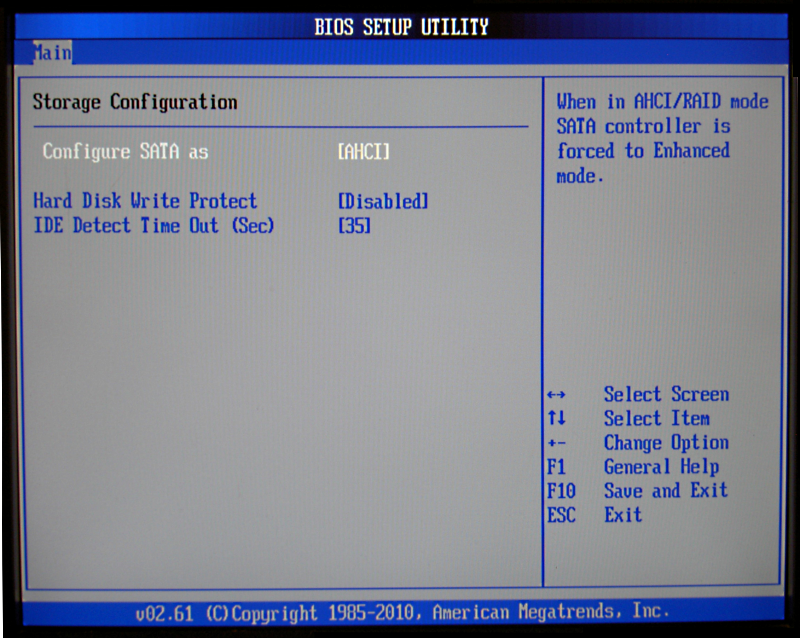
  2. Reboot your PC, enter BIOS setup (press DEL or F1) and make sure that currently SATA controller is configured in IDE mode; and support of AHCI mode exists in BIOS.
  3. 3. Find or download F6 textmode AHCI driver for your SATA controller

  4. Find out the name of your chipset (south bridge). It should be in the user guide of your motherboard or notebook, or at the manufacturer's website. Also one can try to find the SATA controller in the Windows Device Manager under "IDE ATA/ATAPI controllers" or "Storage controllers".
  5. Check your motherboard/notebook driver CD, try to find F6 textmode AHCI driver for your chipset (southbridge). F6 textmode AHCI driver consists of TXTSETUP.OEM, one or several INF files(s), SYS file(s) and CAT file(s). SYS file is a driver itself, CAT file is a catalog of digital signatures to verify integrity of the driver, and INF is an informational file for Windows operating system how to detect hardware, and how to install/uninstall the driver. For example, Intel AHCI driver for ICH10R chipset consists of iaahci.cat, iaAHCI.inf, iastor.cat, iaStor.inf, IaStor.sys, and TXTSETUP.OEM.
  6. If you could not find F6 textmode AHCI driver on the CD, check manufacturer's website of the motherboard/notebook, and also check manufacturer's website of the chipset. For example, for ASUS EEC PC 901 netbook with Intel ICH7-M southbridge, you should check both ASUS and Intel websites. Also downloading latest drivers from manufacturer's website may be helpful if old version of driver from motherboard/notebook CD was found, but didn't work because of alleged bugs. (But bear in mind that sometimes new version of drivers has new bugs, not present in old version.)

4. Perform upgrade installation of AHCI driver via Windows Device Manager

Right-click My Computer, choose Properties, then Device Manager.
Expand IDE ATA/ATAPI controllers, then right-click on Primary IDE Channel and choose Update Driver... from the context menu:
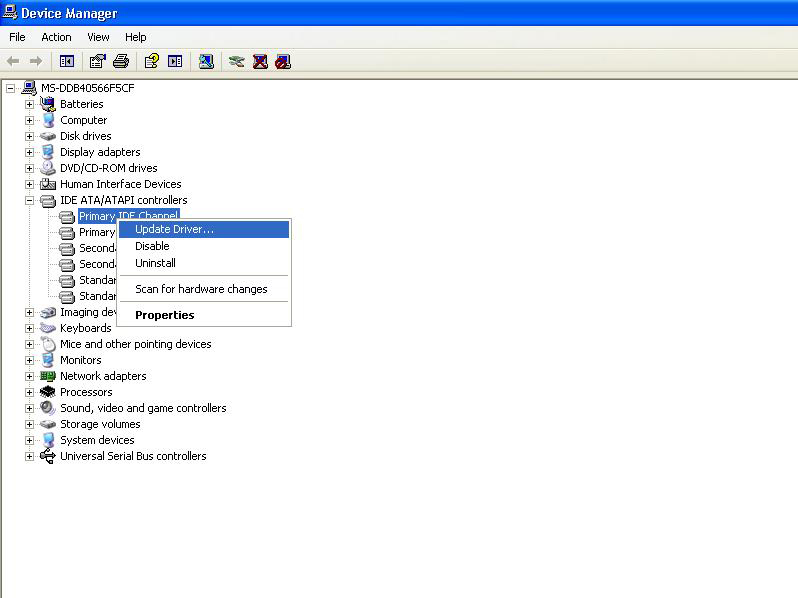
Change from IDE to AHCI without reinstall - Open Windows Device Manager
  1. 5. During reboot, make configuration changes in BIOS setup

    During reboot, enter BIOS Setup (press DEL or F1 key) and enable AHCI mode for your SATA controller:
    Change from IDE to AHCI without reinstall - Enable AHCI Mode In BIOS Setup

[[SOLVED]] MICROPROCESSOR TUTORIAL

HERE ARE SOME OF THE MICROPROCESSOR TUTORIAL SOLUTION ( THEY ALL ARE IMAGES )


MAY THIS BE HELPFUL FOR THE PROGRAMMING IN 8086 SIMMULATOR