Showing posts with label digital. Show all posts

[PDF] Digital logic Free Download

Donald P. Leach  , Albery Paul Malvino and Goutam saha , Digital Principal and Application 6th Edition Tata MacGraw Hill ,2006
                                                                Download Link Here
David J Comer " digital Logic And State machine Design '" 3rd Edition Oxford University Press ,2002
                                                                     Download Link Here
Willam I Fletcher " An Engineering Approach to Digital Design  Prentice hall of India 1990 New Delhi
            Download Link Here

William H. Gothman Digital Electronics; the An Introduction to theory and Practical

                                                                     Download Link Here

[ E-book ] digital image processing ,downloads


[   ]
digital-image-processing-part-one.pdf
[   ]digital-image-processing-part-two.pdf

Digital image processing is the use of computer algorithms to perform image processing on digital images. As a subcategory or field of digital signal processing, digital image processing has many advantages over analog image processing. It allows a much wider range of algorithms to be applied to the input data and can avoid problems such as the build-up of noise and signal distortion during processing. Since images are defined over two dimensions (perhaps more) digital image processing may be modeled in the form of multidimensional systems.

Digital Signatures

A digital code that can be attached to an electronically transmitted message that uniquely identifies the sender. Like a written signature, the purpose of a digital signature is to guarantee that the individual sending the message really is who he or she claims to be. Digital signatures are especially important for electronic commerce and are a key component of most authentication schemes. To be effective, digital signatures must be unforgeable. There are a number of different encryption techniques to guarantee this level of security.

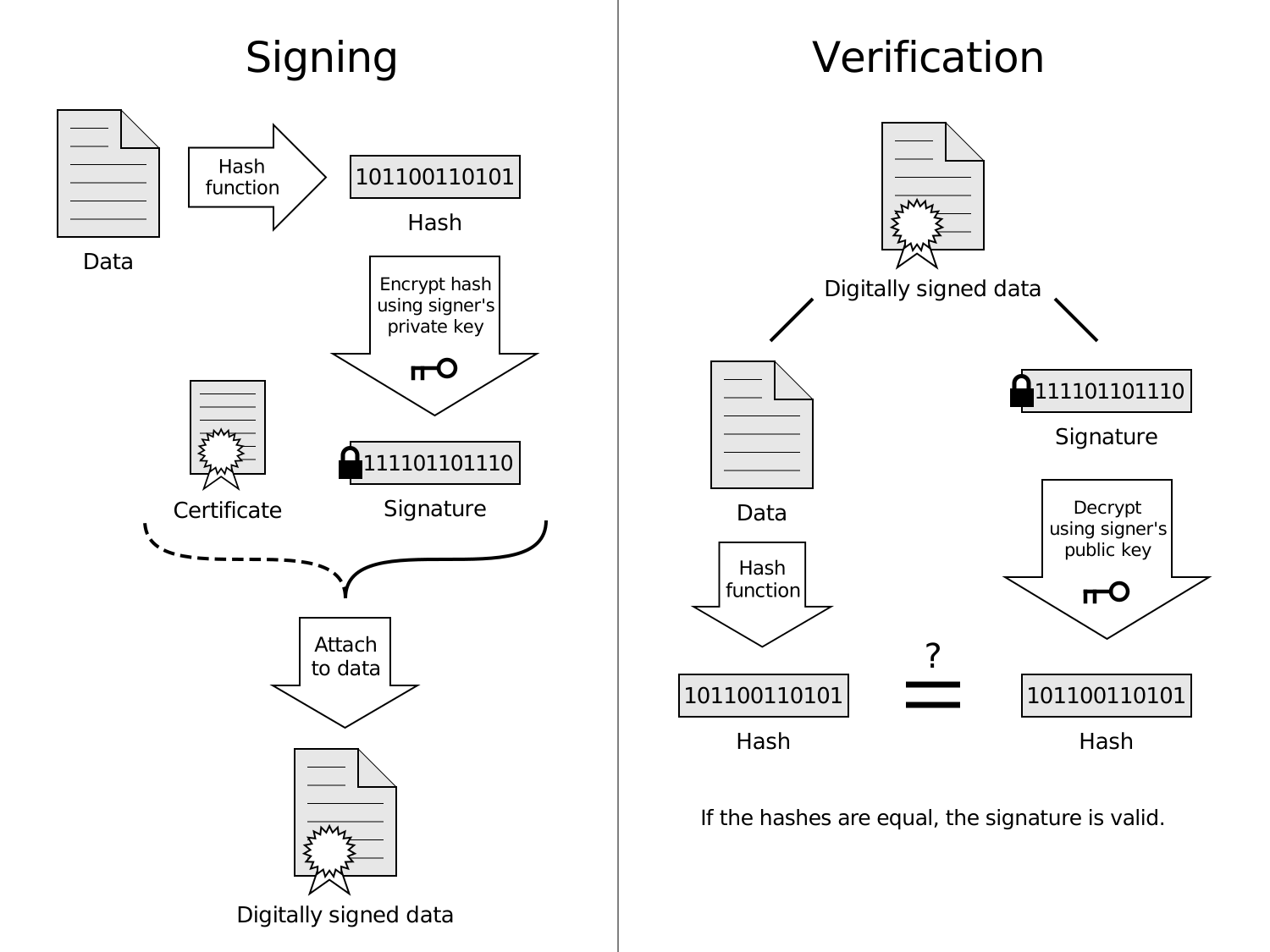
A diagram showing how a digital signature is applied and then verified below.
File:Digital Signature diagram.svg


Digital signatures are often used to implement electronic signatures, a broader term that refers to any electronic data that carries the intent of a signature, but not all electronic signatures use digital signatures.[In some countries, including the United States, India, Brazil]and members of the European Union, electronic signatures have legal significance.
Digital signatures employ a type of asymmetric cryptography. For messages sent through a nonsecure channel, a properly implemented digital signature gives the receiver reason to believe the message was sent by the claimed sender. Digital signatures are equivalent to traditional handwritten signatures in many respects, but properly implemented digital signatures are more difficult to forge than the handwritten type. Digital signature schemes, in the sense used here, are cryptographically based, and must be implemented properly to be effective. Digital signatures can also provide non-repudiation, meaning that the signer cannot successfully claim they did not sign a message, while also claiming their private key remains secret; further, some non-repudiation schemes offer a time stamp for the digital signature, so that even if the private key is exposed, the signature is valid. Digitally signed messages may be anything representable as a bitstring: examples include electronic mail, contracts, or a message sent via some other cryptographic protocol.


How It Works

Assume you were going to send the draft of a contract to your lawyer in another town. You want to give your lawyer the assurance that it was unchanged from what you sent and that it is really from you.
  1. You copy-and-paste the contract (it's a short one!) into an e-mail note.
  2. Using special software, you obtain a message hash (mathematical summary) of the contract.
  3. You then use a private key that you have previously obtained from a public-private key authority to encrypt the hash.
  4. The encrypted hash becomes your digital signature of the message. (Note that it will be different each time you send a message.)
At the other end, your lawyer receives the message.
  1. To make sure it's intact and from you, your lawyer makes a hash of the received message.
  2. Your lawyer then uses your public key to decrypt the message hash or summary.
  3. If the hashes match, the received message is valid.

Applications of digital signatures

As organizations move away from paper documents with ink signatures or authenticity stamps, digital signatures can provide added assurances of the evidence to provenance, identity, and status of an electronic document as well as acknowledging informed consent and approval by a signatory. The United States Government Printing Office (GPO) publishes electronic versions of the budget, public and private laws, and congressional bills with digital signatures. Universities including Penn State, University of Chicago, and Stanford are publishing electronic student transcripts with digital signatures.
Below are some common reasons for applying a digital signature to communications:

[ Arduino ] Digital audio player


For other  interesting ARDUINO PROJECTS here

So far in this series, we’ve had a diverse look at how Arduino can interact with a range of real-world devices from servo motors to ultrasonic range finders, TVs to humidity sensors. Now we'll see if we could get the Arduino to make a few sounds. We’ll actually do a bit better than that — we’ll look at the importance of pulse width modulation (PWM) to microcontrollers by building our own digital audio player called Auduino.

The two versions of our Auduino audio player. The Ethernet shield version (bottom) gives better results with more flash cards.

What we’re building

Network Security

Network Security

Data on the network is analogous to possessions of a person. It has to be kept secure from others with malicious intent. This intent ranges from bringing down servers on the network to using people's private information like credit card numbers to sabotage of major organizations with a presence on a network. To secure data, one has to ensure that it makes sense only to those for whom it is meant. This is the case for data transactions where we want to prevent eavesdroppers from listening to and stealing data. Other aspects of security involve protecting user data on a computer by providing password restricted access to the data and maybe some resources so that only authorized people get to use these,  and identifying miscreants and thwarting their attempts to cause damage to the network among other things.
The various issues in Network security are as follows :
  1. Authentication: We have to check that the person who has requested for something or has sent an e-mail is indeed allowed to do so. In this process we will also look at how the person authenticates his identity to a remote machine.
  2. Integrity: We have to check that the message which we have received is indeed the message which was sent. Here CRC will not be enough because somebody may deliberately change the data. Nobody along the route should be able to change the data.
  3. Confidentiality: Nobody should be able to read the data on the way so we need Encryption
  4. Non-repudiation: Once we sent a message, there should be no way that we can deny sending it and we have to accept that we had sent it.
  5. Authorization: This refers to the kind of service which is allowed for a particular client. Even though a user is authenticated we may decide not to authorize him to use a particular service.

Difference between microprocessor and microcontroller

A microprocessor (abbreviated as μP or uP) is a computer electronic component made from miniaturized transistors and other circuit elements on a single semiconductor integrated circuit (IC) (microchip or just chip). The central processing unit (CPU) is the most well known microprocessor, but many other components in a computer have them, such as the Graphics Processing Unit (GPU) on a video card. In the world of personal computers, the terms microprocessor and CPU are used interchangeably. At the heart of all personal computers and most workstations sits a microprocessor. Microprocessors also control the logic of almost all digital devices, from clock radios to fuel‐injection systems for automobiles.